Core concepts
Task types and the three lines model
Tidal has three task types because three different groups of people do three different jobs: the first line operates the controls, the second line concludes on whether they worked, and the third line audits both independently. This article covers which type belongs to which group, and how to set up assignments and plans so each group only gets its own work.
Choosing between Executions, Assessments and Issues
Pick the type by asking who is going to do the work, not what the work is about.
| Task type | Who does it | What it establishes | How it closes |
|---|---|---|---|
| Execution | The team that runs the asset | That the control was carried out over a period, with evidence | Closed once the work is done and the evidence is attached |
| Assessment | Security & compliance, risk, or quality | Whether the controls in scope were effective over that period | Closed by recording a verdict: Effective or Ineffective |
| Issue | Whoever found the problem | That something needs fixing, and who is fixing it | Closed once the finding is resolved |
If you are a small team where the same person does all three jobs, Executions alone are enough. The split starts paying off once the people who operate a control are no longer the people who judge it.
How the three lines split the work
The three lines model separates doing the work from judging the work, and Tidal gives each line its own task type so the two never collapse into one.
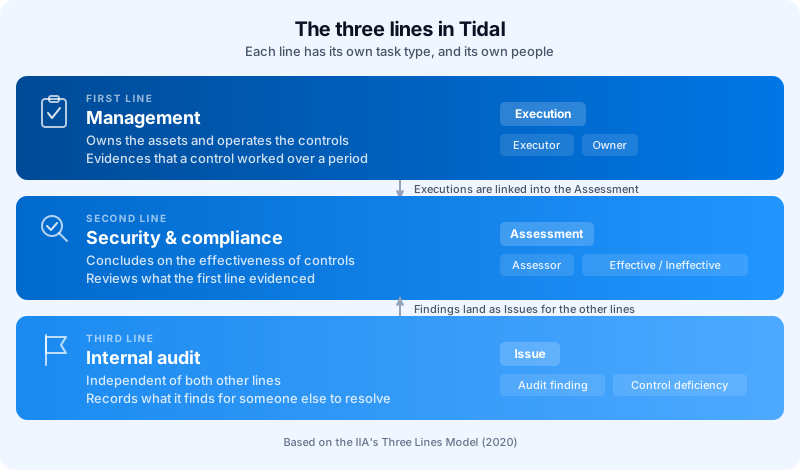
The important property is independence. When the team that configured a firewall is also the team that signs off that the firewall control is effective, the sign-off is worth very little to an auditor. By giving the second line its own task with its own verdict, Tidal records two separate statements about the same period: the first line's "we did this, here is the proof", and the second line's "we looked at that proof and we agree it worked".
First line: Executions
An Execution asks the people who operate a system to carry out a control and leave proof that they did.
The first line is management in the broad sense: asset owners, engineering, IT, HR, facilities. They are accountable for the thing itself, so they are the ones who patch the servers, run the awareness training, and review the access list.
Two details make an Execution more than a to-do item:
- It covers a period, not a moment. An Execution scoped to "Year 2026" or a quarter evidences that the control operated across that whole window, which is what an auditor asks about.
- It carries the evidence. Whatever the first line uploads or writes in the conversation stays attached to that period, so the record survives long after the people involved have moved on.
When a plan generates an Execution, it fills in the people from the roles already set on the control and the asset. Everyone listed under Executors becomes a contributor on the task, and everyone under Owners becomes an owner. You set these once per control or asset instead of assigning every generated task by hand.
The first line does not have to work in Tidal. If your engineers live in Jira, Azure DevOps or TOPdesk, you can raise a work item there straight from a Tidal task, and its status syncs back into the Tidal task overview. The first line stays in its own tool while the second line keeps oversight in Tidal. See External issues.
Second line: Assessments
An Assessment asks an independent reviewer to conclude on whether the controls in its scope were effective, based on what the first line actually did.
The second line is the expertise-and-challenge function: security & compliance officers, risk management, quality management. They do not implement the controls, they judge them. Their contributors come from the Assessors role on the control and the asset, which is why the same plan machinery can hand first-line and second-line work to entirely different people over the same scope.
Recording the verdict
An Assessment closes by recording a conclusion rather than by being ticked off. While it is open its effectiveness reads Undetermined; closing it means choosing Effective or Ineffective. Reopening an Assessment resets the verdict to Undetermined, so a reopened conclusion never lingers as a stale sign-off.
That verdict feeds the effectiveness Tidal computes for the control itself. A control counts as effective when it has no failing tests, no overdue tasks, and its most recent closed Assessment is not rated Ineffective. A control with no tests and no tasks at all does not count as effective either, so closing an Assessment rated Effective is one of the two ways to establish effectiveness on a control that has no automated test behind it.
Seeing the first line's work
An Assessment does not need you to gather up the underlying Executions, because it finds them itself. The Linked tasks tab shows every Execution that falls in the same scope, and Tidal matches them on three things at once:
- They share at least one control with the Assessment.
- Their periods overlap.
- They share at least one asset.
The asset rule has one exception worth knowing. If neither the Assessment nor the Execution has any assets linked, both are treated as company-wide and a shared control plus an overlapping period is enough to link them. If only one of the two has assets, they do not link at all, because an asset-scoped task and a company-wide task are not statements about the same thing.
Mismatched periods break the link silently. An Assessment for Q1 will not pick up an Execution scoped to Year 2026 unless the periods genuinely overlap. If a Linked tasks tab looks emptier than you expect, compare the periods on both plans first.
From that tab the second line can also act on what it finds, including reopening an Execution whose evidence does not hold up.
Third line: Issues
An Issue records something that needs fixing, and keeps it separate from the person who found it.
The third line is internal audit: independent of both other lines and reporting to the governing body rather than to management. Its output is not implementation work and not a periodic verdict, it is findings. In Tidal those findings land as Issues, and the Audit finding issue type exists for exactly this. Alongside it you can classify an Issue as a Control deficiency, Control gap, Incident, Action plan, Opportunity, Opportunity for improvement, or Generic.
Issues differ from the other two types in one structural way: plans do not generate them. Executions and Assessments are scheduled work that you know is coming, so a plan creates them on a frequency. An Issue exists because something happened, so you create it when it does, give it a priority and a due date, and link it to the controls and assets it concerns.
This is also why the third line does not fix what it finds. Internal audit raising an Issue and then resolving it themselves would put them back inside the process they are meant to audit. The finding gets an owner from the line that has to act on it, and the audit trail shows who raised it and who closed it.
Issues are not audit-only. Anyone can raise one, and most Issues in practice come from incidents and control gaps found during normal work rather than from a formal audit. The third line is the reason the type exists, not the only user of it.
Setting this up for a larger organisation
The whole model runs on two things: roles assigned once on your controls and assets, and a pair of plans over the same scope.
Assign the roles on the control and the asset
On any control or asset you can fill in Owners, Executors and Assessors, each with the Assign link. Getting these right is what makes the rest automatic, because every task a plan generates draws its people from these fields. In an organisation with hundreds of asset and control combinations, this is the difference between configuring a plan once and hand-assigning tasks every quarter.
Keep the two operational roles genuinely separate. If the same person appears under Executors and Assessors on the same control, the second line's independence exists on paper only.
Run an Execution plan and an Assessment plan over the same scope
Under Ask users to, a plan creates either Execute the control tasks or Assess the control tasks, not both. To get the full two-line cycle you configure two plans across the same controls and assets, one of each type, on periods that overlap.
Choose a different granularity per line
The How tasks are created setting is where asset-based organisations get the most out of this, because the two lines want opposite granularity:
| Line | Setting | Result |
|---|---|---|
| First line | Separate tasks | One Execution per combination of a control and an asset, so each team gets only the work for the systems it runs |
| Second line | One task per control | One Assessment per control covering all its assets, so the second line concludes once instead of reviewing every asset separately |
You can also group by asset instead, with One task per asset, which suits a review that is really about one system, vendor, or business unit across all the controls that apply to it.
Start with one control. Set the roles on a single control and its assets, build the two plans over just that control, and run a full cycle end to end. Once you have seen the Executions arrive with the right people and the Assessment pick them up in its Linked tasks tab, widen the scope.
Where the model comes from
Tidal's task types follow the IIA's Three Lines Model, published by the Institute of Internal Auditors in July 2020 as an update to what was previously called the three lines of defence.
The 2020 update matters for how you read the model. It places the first and second line both under management rather than treating them as separate departments, keeps internal audit independent, and drops the defensive framing in favour of roles that contribute to governance. That is why the first and second line in Tidal share the same task machinery, the same plans and the same periods, and differ only in who is assigned and what closing the task records, while the third line's work has a different shape entirely.
- Previous
- How Tidal works