Integrations
Getting started with Integrations
Integrations connect Tidal Control to the systems you already run, so that compliance tests read your real configuration instead of someone attesting to it. All of them are read-only, and each one is set up once in Settings with credentials you create in the other system.
Navigating the Integrations overview page
The Integrations page in Settings shows all available external system connections and your current configuration status.
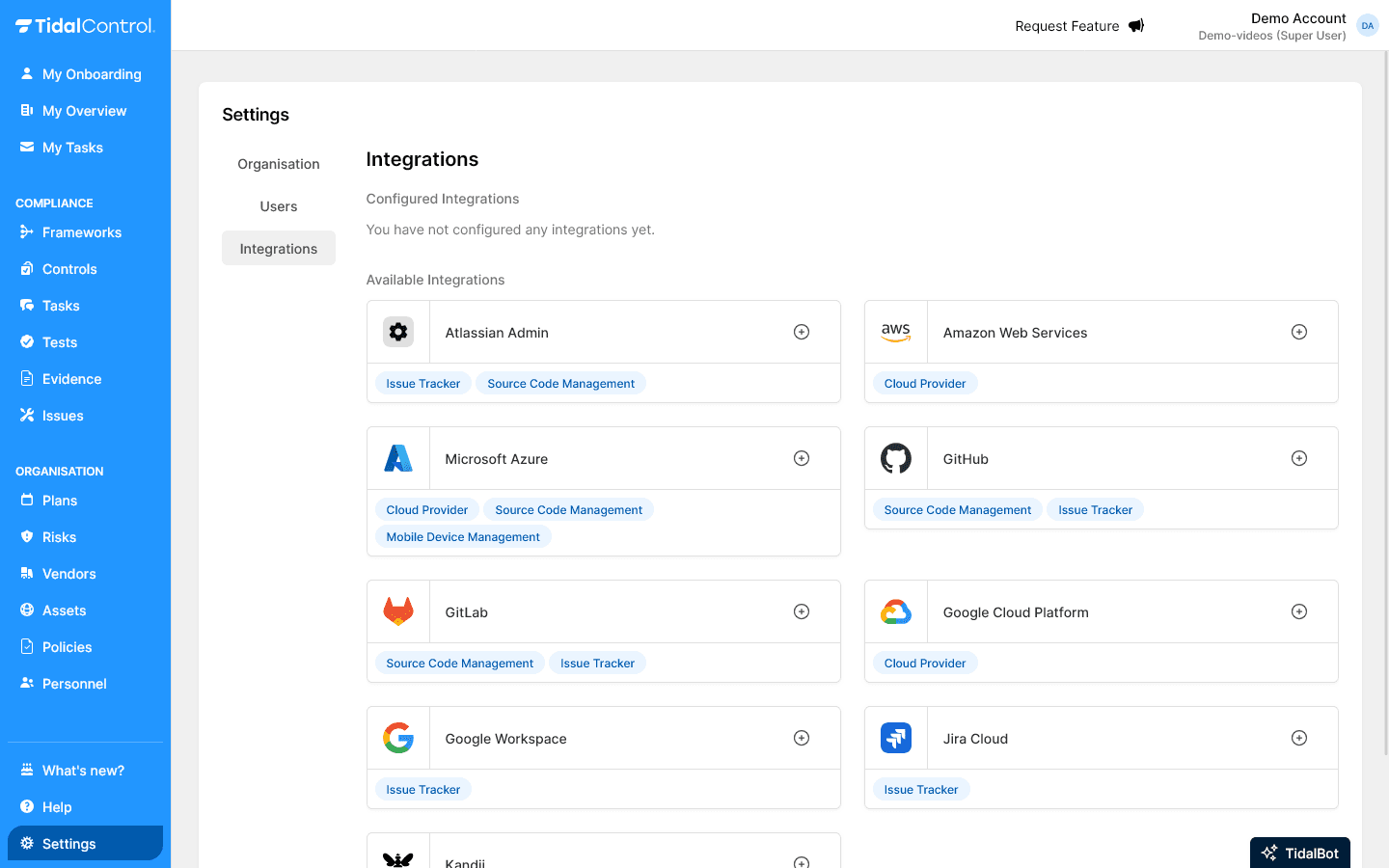
What you see in the overview:
- Configured Integrations - Active integrations already set up
- Available Integrations - Available systems for new connections
- Integration tiles - Visual cards per external system
Configured vs Available Integrations
Configured integrations are already running tests; available ones are one click away from being connected.
Configured Integrations section:
- Active connections already set up and working
- Test execution possible via these integrations
Available Integrations section:
- Available systems for new connections
- Click the plus icon to configure integrations for use
Initial setup status:
"You have not configured any integrations yet."
This means you haven't connected any external systems yet and all integrations are still available for configuration.
Understanding available integrations
Tidal Control supports 32 integrations, grouped below by what kind of system they connect to. Which ones matter depends entirely on where your systems already live, so most organisations configure a handful rather than all of them.
Cloud providers
Cloud integrations check the security configuration of the platform itself: identity and access, encryption, network rules and backups.
- Amazon Web Services (AWS)
- Microsoft Azure
- Google Cloud Platform
- Cloudflare
- CockroachDB Cloud
- DigitalOcean
- Hetzner Cloud
- Neon
- OVHcloud
- Scaleway
- STACKIT
- Supabase
- Vercel
Source code management
Code platform integrations check repository and pipeline security: branch protection, scanning and dependency risk.
Issue trackers
These connect the systems your teams already work in, so findings and remediation live where the work happens. Several also serve as external issue targets.
Security scanners
Scanners bring existing vulnerability and threat findings into your compliance evidence.
Observability
Observability tools receive production data, so their access and privacy configuration is in audit scope in its own right.
Mobile device management
Device management integrations provide the endpoint evidence auditors ask for on encryption and enrolment.
AI providers
AI integrations check how your organisation's use of model providers is configured and governed.
Document management
These check how documents shared outside your organisation are protected.
CRM
Some integrations appear in more than one family. Datadog covers both security scanning and observability, and Microsoft Azure covers both the cloud platform and device management, so they are listed under each.
Integration activation process
Every integration follows the same shape: create read-only credentials in the other system, then paste them into Tidal.
General activation steps
For each integration, follow a similar process:
- Select integration from Available Integrations section
- Click plus icon to start setup
- Follow configuration wizard for specific integration
- Configure authentication (API keys, OAuth, service accounts)
- Test connectivity to verify operation
Authentication and security
When setting up authentication, pay attention to the following security measures:
- Least privilege principle - Don't give Tidal integration more rights than necessary. It's often sufficient to give Tidal read rights to specific system functionality.
- Encrypted connections to all external systems
- Regular credential rotation according to best practices
Tidal stores credential information securely in a protected 'key vault' and only communicates with encrypted connections.
Suspect credentials are compromised? Change or remove them immediately, and send an email to support@tidalcontrol.com
Integration impact on Tests
Connecting an integration is what makes its tests available; until then they cannot run at all.
How integrations activate Tests
Which tests become available depends on which integration you connect: each one unlocks a different set.
Integration configuration enables external tests:
- Integration becomes active after successful configuration
- External tests become available for that integration
- Tests can retrieve data from connected systems
- Real-time compliance monitoring becomes possible
Read more about using automatic tests.
Integrations versus manual controls
Integrations enable Tidal Control to connect with external systems and tools for real-time compliance monitoring. By configuring integrations, external tests can automatically retrieve data from your existing IT infrastructure.
Core functionalities:
- Real-time data retrieval from external systems for compliance validation
- Automatic compliance tests based on actual system configurations
- Centralised monitoring of distributed IT infrastructure
- Objective compliance measurements without manual data collection
- Continuous compliance monitoring instead of periodic audits
Integrations vs manual compliance controls
Integrations suit anything a system can report on itself; a manual control is still needed for judgment calls a system can't make.
Integrations are ideal for:
- Technical configuration validation (encryption, access control)
- Real-time security baseline monitoring
- Automatic collection of compliance evidence
- Large-scale infrastructure compliance monitoring
Manual controls remain necessary for:
- Procedural compliance (training, awareness)
- Qualitative assessments (policy effectiveness)
- Business process evaluations
- Strategic compliance decisions
Next steps
Now that you understand Integrations:
- Identify critical external systems for compliance monitoring
- Prioritise integrations based on business and compliance impact
- Start with one integration to learn the process
- Select specific integration from articles below for detailed setup instructions
For specific integration setup instructions, see the individual articles in this section for each available integration.
- Previous
- Adding evidence
- Next
- 1Password